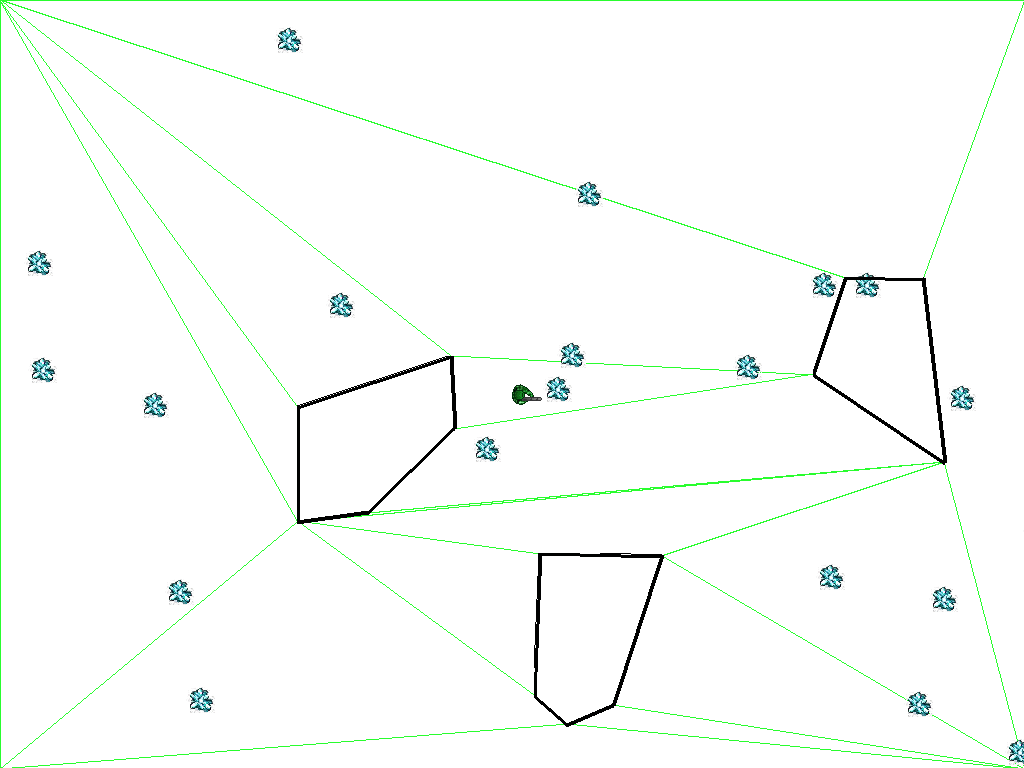
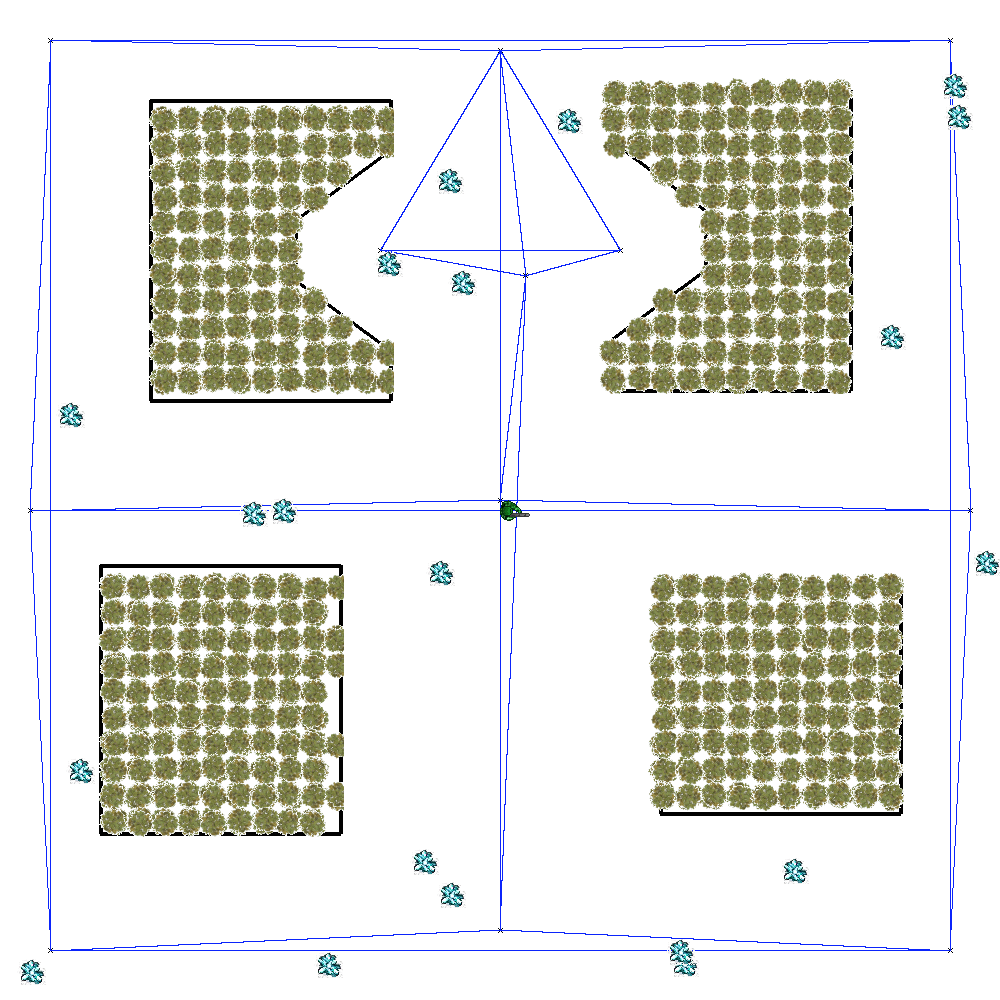
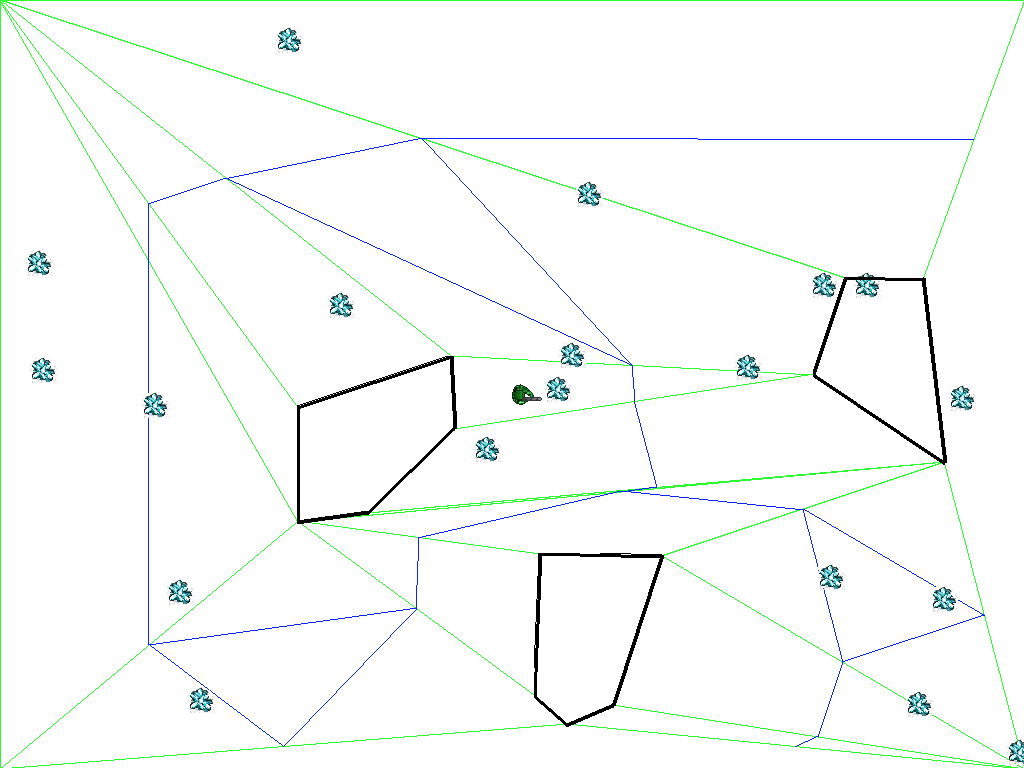
In Unity, a NavMesh is a set of convex Polygons covering all obstacle-free navigable areas. This project involves implementing an algorithm to generate a navigation mesh (NavMesh) for an environment and to construct a path network from the resulting mesh. A path graph can then be formed by connecting adjacent NavMesh polygons through shared edges AKA portals. The nodes (pathNodes) of the network are created at the midpoints of these portal edges.
TODO
Coverage- Generate adjacent polygons (triangles) to cover the entire navigable space
Reachability: Create a path graph from the navmesh
Mesh Optimization: Merge the triangles into larger and more efficient convex polygons
Using midpoints for the nodes is useful because you can move in a straight line between any 2 points in a convex polygon; there will never be a path returned that causes the agent to run into an obstacle
It might get close to the expanded geometry, but a raycast is sufficient to maintain clearance
So can be touching the sides of the expanded geometry (radius of agent)
Navigation Mesh
A navigation mesh is a means to automatically identify points at which to place path nodes. A navigation mesh is a set of convex hulls (polygons) overlayed on an environment such that the area wihin each hull is guaranteed to be obstacle-free. Note the relatively small number of convex hulls needed to map out navagable areas in the figure below. The convexity of the hulls is important because an agent within the area of a hull can move to any other point within the hull without crossing a hull boundary.
https://faculty.cc.gatech.edu/~surban6/2015-cs4731/homeworks/homework2.html
Path Network
A path network is a set of path nodes and edges that facilitates obstacle avoidance. The path network discretizes a continuous space into a small number of points and edges that allow transitions between points. However, unlike a grid topology, a path network does not require the agent to be at one of the path nodes at all times. The agent can be at any point in the terrain. When the agent needs to move to a different location and an obstacle is in the way, the agent can move to the nearest path node accessible by straight-line movement and then find a path through the edges of the path network to another path node near to the desired destination.
Creating portals from midpoints
Furthermore, when two convex hulls are adjacent to each other (i.e., they share an edge), that edge can be thought of as a “portal”---an invisible door---from one safe navigation region to another. Connecting adjacent convex hulls into a network of safe passages results in a path node network through which an agent can travel between any two points in the environment without fear of collision. That is, a navigation mesh can be used to automatically place path nodes throughout a game map. The resulting network of path nodes creates a super-highway by which an agent can move from any safe area to any other safe area.
Setup
Open the Navmesh scene and the CreateNavMesh.cs file.
Follow the comments in CreateNavMesh.Create() to build a working
navmesh generator
NavMesh.cs
using System.Collections;using System.Collections.Generic;using UnityEngine;using GameAICourse;public class NavMesh : DiscretizedSpaceMonoBehavior{ private const string PathNodeMarkersGroupName = "PathNodeMarkersGroup"; public MoveBall moveBall; List<Vector2> navmeshCentroids = new List<Vector2>(); public Color LineColor = Color.green; //public Material LineMaterial; public Material pathEdgeMat; public Material polygonMat; List<GameObject> pathNodeObjects = new List<GameObject>(); List<GameObject> pathNodeCentroidObjects = new List<GameObject>(); public GameObject pathNodePrefab; public GameObject pathNodeOutlinePrefab; public GameObject pathNodeCentroidPrefab; public Obstacle NavmeshPolygonPrefab; List<Polygon> VisualizeNavMeshPolygons; List<Polygon> VisualizeOriginalTriangles; public bool ShowPathNodes = true; public bool DisableGeometryExpansion = false; public override void Awake() { base.Awake(); Obstacles = this.GetComponent<Obstacles>(); if (Obstacles == null) Debug.LogError("no obstacles"); } // Start is called before the first frame update public override void Start() { base.Start(); // Following commented out because presets will immediately override... //Obstacles.Init(); //Bake(); Utils.DisplayName("CreateNavMesh", CreateNavMesh.StudentAuthorName); } public override void Bake() { base.Bake(); List<Vector2> pnodes; List<List<int>> pedges; List<Polygon> offsetObst; AdjacentPolygons adjPolys; //Debug.Log("NavMesh: calling student code!"); float agentRadius = moveBall.Radius; if(DisableGeometryExpansion) agentRadius = 0f; offsetObst = Utils.GenerateExpandedGeometry( BottomLeftCornerWCS, Boundary.size.x, Boundary.size.z, agentRadius, Obstacles.GetObstaclePolygons() ); CreateNavMesh.Create(BottomLeftCornerWCS, Boundary.size.x, Boundary.size.z, offsetObst, agentRadius, out VisualizeOriginalTriangles, out VisualizeNavMeshPolygons, out adjPolys, out pnodes, out pedges ); PathNodes = pnodes; PathEdges = pedges; CreatePathNodeMarkerObjects(PathNodes); PurgeOutdatedLineViz(); CreateVizOffsetPolys(offsetObst); // TODO remove me CreateVizNavMesh(); CreateVizTriangles(); CreateNetworkLines(Utils.ZOffset); } void PurgeOutdatedLineViz() { var linegroup = this.transform.Find(Utils.LineGroupName); if (linegroup != null) { linegroup.name = "MARKED_FOR_DELETION"; linegroup.gameObject.SetActive(false); Destroy(linegroup.gameObject); } } void CreateVizOffsetPolys(List<Polygon> offsetObst) { var parent = Utils.FindOrCreateGameObjectByName(this.gameObject, Utils.LineGroupName); if (VisualizeNavMeshPolygons == null) return; foreach (var poly in offsetObst) { var pts = poly.getPoints(); for (int i = 0, j = pts.Length - 1; i < pts.Length; j = i++) { Utils.DrawLine(pts[i], pts[j], Utils.ZOffset + 0.04f, parent, Color.blue, LineMaterial, 0.1f); } } } void CreateVizNavMesh() { var parent = Utils.FindOrCreateGameObjectByName(this.gameObject, Utils.LineGroupName); if (VisualizeNavMeshPolygons == null) return; foreach(var poly in VisualizeNavMeshPolygons) { var pts = poly.getPoints(); for (int i = 0, j=pts.Length-1; i < pts.Length; j=i++) { Utils.DrawLine(pts[i], pts[j], Utils.ZOffset, parent, Color.blue, LineMaterial, 0.006f); } } } void CreateVizTriangles() { var parent = Utils.FindOrCreateGameObjectByName(this.gameObject, Utils.LineGroupName); if (VisualizeOriginalTriangles == null) return; foreach (var poly in VisualizeOriginalTriangles) { var pts = poly.getPoints(); if(pts.Length == 3) { var tri = new GameObject("triangle"); tri.transform.parent = parent.transform; var vt = tri.AddComponent<VisualizeTriangle>(); vt.SetTriangle(pts[0], pts[2], pts[1]); } } } //void CreateNetworkLines() //{ // //PurgeOutdatedLineViz(); // var parent = Utils.FindOrCreateGameObjectByName(this.gameObject, Utils.LineGroupName); // HashSet<System.Tuple<int, int>> hs = new HashSet<System.Tuple<int, int>>(); // if (PathEdges != null) // { // for (int i = 0; i < PathEdges.Count; ++i) // { // var pts = PathEdges[i]; // if (pts != null) // { // for (int j = 0; j < pts.Count; ++j) // { // var smaller = i; // var bigger = pts[j]; // if (bigger < smaller) // { // var tmp = bigger; // bigger = smaller; // smaller = tmp; // } // var tup = new System.Tuple<int, int>(smaller, bigger); // if (!hs.Contains(tup)) // { // hs.Add(tup); // Utils.DrawLine(PathNodes[i], PathNodes[pts[j]], Utils.ZOffset, parent, LineColor, LineMaterial); // } // } // } // } // } //} void PurgeGroup(string gname) { var group = this.transform.Find(gname); if (group != null) { group.name = "MARKED_FOR_DELETION"; group.gameObject.SetActive(false); Destroy(group.gameObject); } } void PurgeOutdatedPathNodeMarkers() { PurgeGroup(PathNodeMarkersGroupName); } void CreatePathNodeMarkerObjects(List<Vector2> pathNodes) { PurgeOutdatedPathNodeMarkers(); var parent = Utils.FindOrCreateGameObjectByName(this.gameObject, PathNodeMarkersGroupName); GameObject prefab = pathNodePrefab; if (HideBlockingDetails) { prefab = pathNodeOutlinePrefab; } if (ShowPathNodes) { foreach (Vector2 pn in pathNodes) { GameObject pno = Instantiate(prefab, new Vector3(pn.x, Utils.ZOffset + 0.01f, pn.y), Quaternion.identity, parent.transform); pno.transform.localScale = Vector3.one * 2f * moveBall.Radius; pathNodeObjects.Add(pno); } } }}
Create NavMesh
Starter code
CreateNavMesh.cs
// compile_check// Remove the line above if you are subitting to GradeScope for a grade. But leave it if you only want to check// that your code compiles and the autograder can access your public methods.using System.Collections;using System.Collections.Generic;using UnityEngine;namespace GameAICourse{ public class CreateNavMesh { public static string StudentAuthorName = "George P. Burdell ← Not your name, change it!"; // Helper method provided to help you implement this file. Leave as is. // Converts Vector2 to Vector2Int with default factor for computational geometry (1000) static public Vector2Int Convert(Vector2 v) { return CG.Convert(v); } // Helper method provided to help you implement this file. Leave as is. // Returns float converted to int according to default scaling factor (1000) public static int Convert(float v) { return CG.Convert(v); } // Helper method provided to help you implement this file. Leave as is. // Returns Vector2Int converted to Vector2 according to default scaling factor (1000) public static Vector2 ConvertToFloat(Vector2Int v) { float f = 1f / (float)CG.FloatToIntFactor; return new Vector2(v.x * f, v.y * f); } // Helper method provided to help you implement this file. Leave as is. // Returns int converted to float according to default scaling factor (1000) public static float ConvertToFloat(int v) { float f = 1f / (float)CG.FloatToIntFactor; return v * f; } // Helper method provided to help you implement this file. Leave as is. // Returns true if point p is inside (but not on edge) the polygon defined by pts (CCW winding). False, otherwise public static bool IsPointInsidePolygon(Vector2Int[] pts, Vector2Int p) { return CG.InPoly1(pts, p) == CG.PointPolygonIntersectionType.Inside; } // Helper method provided to help you implement this file. Leave as is. // Returns true if there is at least one intersection between A and a polygon in polys public static bool IntersectsConvexPolygons(Polygon A, List<Polygon> polys) { return CG.IntersectionConvexPolygons(A, polys); } // Helper method provided to help you implement this file. Leave as is. // Tests to see if AB is an edge in a list of polys public static bool IsLineSegmentInPolygons(Vector2Int A, Vector2Int B, List<Polygon> polys) { return CG.IsLineSegmentInPolygons(A, B, polys); } // Helper method provided to help you implement this file. Leave as is. // Tests if abc are collinear static public bool IsCollinear(Vector2Int a, Vector2Int b, Vector2Int c) { return CG.Collinear(a, b, c); } // Helper method provided to help you implement this file. Leave as is. // Tests if the polygon winding is CCW static public bool IsCCW(Vector2Int[] poly) { return CG.Ccw(poly); } // Helper method provided to help you implement this file. Leave as is. // Tests if C is between A and B (first tests if C is collinear with A and B // and then whether C is on the line between A and B static public bool Between(Vector2Int a, Vector2Int b, Vector2Int c) { return CG.Between(a, b, c); } // Helper method provided to help you implement this file. Leave as is. // Tests if AB intersects with the interior of any poly of polys (touching the outside of a poly does not // count an intersection) public static bool InteriorIntersectionLineSegmentWithPolygons(Vector2Int A, Vector2Int B, List<Polygon> polys) { return CG.InteriorIntersectionLineSegmentWithPolygons(A, B, polys); } // Helper method provided to help you implement this file. Leave as is. // Merges two polygons into one across a common edge AB/BA public static Polygon MergePolygons(Polygon poly1, Polygon poly2, Vector2Int A, Vector2Int B) { return Utils.MergePolygons(poly1, poly2, A, B); } // Helper method provided to help you implement this file. Leave as is. // Tests if a poly is convex static public bool IsConvex(Vector2Int[] poly) { return CG.CheckForConvexity(poly); } // Create(): Creates a navmesh and path graph (associated with navmesh) // canvasOrigin: bottom left corner of navigable region in world coordinates // canvasWidth: width of navigable region in world dimensions // canvasHeight: height of navigable region in world dimensions // obstacles: a list of CCW Polygons that are obstacles in the scene. These are already expanded // and clipped to the canvas. No holes are present in the polygons, but are possibly concave. // agentRadius: the radius of the agent // origTriangles: out param of the triangles that are used for navmesh generation // These triangles are passed out for validation and visualization. // navmeshPolygons: out param of the convex polygons of the navmesh (list). // These polys are passed out for validation and visualization and should be merged. // adjPolys: out param of type AdjacentPolygons. These are used validation and should be merged. // pathNodes: a list of graph nodes (either centered on portal edges or navmesh polygon, depending // on assignment requirements) // pathEdges: graph adjacency list for each node. Cooresponding index of pathNodes match // a node with its edge list. All nodes must have an edge list (no null list) // entries in each edge list are indices into pathNodes // public static void Create( Vector2 canvasOrigin, float canvasWidth, float canvasHeight, List<Polygon> obstacles, float agentRadius, out List<Polygon> origTriangles, out List<Polygon> navmeshPolygons, out AdjacentPolygons adjPolys, out List<Vector2> pathNodes, out List<List<int>> pathEdges ) { // Some basic initialization pathEdges = new List<List<int>>(); pathNodes = new List<Vector2>(); origTriangles = new List<Polygon>(); navmeshPolygons = null; // This is a special dictionary for tracking polygons that share // edges. It is going to be used to determine which triangles can be merged // into larger convex polygons. Later, it will also be used for generating // the pathNetwork on top of the navmesh adjPolys = new AdjacentPolygons(); // Obtain all the vertices that are going to be used to form our triangles List<Vector2Int> obstacleVertices; Utils.AllVerticesFromPolygons(obstacles, out obstacleVertices); // Let's also add the four corners of the canvas (with offset) var A = canvasOrigin + new Vector2(agentRadius, agentRadius); var B = canvasOrigin + new Vector2(0f, canvasHeight) + new Vector2(agentRadius, -agentRadius); var C = canvasOrigin + new Vector2(canvasWidth, canvasHeight) + new Vector2(-agentRadius, -agentRadius); var D = canvasOrigin + new Vector2(canvasWidth, 0f) + new Vector2(-agentRadius, agentRadius); var Ai = Convert(A); var Bi = Convert(B); var Ci = Convert(C); var Di = Convert(D); obstacleVertices.Add(Ai); obstacleVertices.Add(Bi); obstacleVertices.Add(Ci); obstacleVertices.Add(Di); // ******************** PHASE 0 - Change your name string ************************ // TODO set your name above //********************* PHASE I - Brute force triangle formation ***************** // In this phase, some scaffolding is provided for you. Your goal to to produce // triangles that will serve as the foundation of your navmesh. You will use // a brute force method of evaluating all combinations of three vertices to see // if a valid triangle is formed. This includes checking for degenerate triangles, // triangles that intersect obstacle boundaries, and triangles that intersect // triangles you already made. There is also a special test to see if triangles // break adjacency (described later). // Iterate through combinations of obstacle vertices that can form triangle // candidates. var obstVertCount = obstacleVertices.Count; for (int i = 0; i < obstVertCount - 2; ++i) { for (int j = i + 1; j < obstVertCount - 1; ++j) { for (int k = j + 1; k < obstVertCount; ++k) { // These are vertices for a candidate triangle // that we hope to form var V1 = obstacleVertices[i]; var V2 = obstacleVertices[j]; var V3 = obstacleVertices[k]; // TODO This inner loop involves tasks for you to implement // TODO first lets check if the candidate triangle // is NOT degenerate. Use IsCollinear(), if // it is then just call continue to go to the next tri // TODO The next part is potentially a little tricky to understand, // but easy to implement. Many of the edges of the triangles // you form will be adjacent to obstacles. // The problem is that greedy triangle formation // can make triangles that are "too big" and block adjacencies // from formingCreate a path graph from the navmeshts. You will probably want to write a helper method // to do this separately with the three candidate triangle edges. // Use Between() to test each obstacle vertex against the candidate // triangle edge. This test is important to get right because // it will stop triangles from forming that block adjacencies from forming. // If there is a vertex Between(), then "continue" to the next Triangle. // (Note: that if a tri edge is true for IsLineSegmentInPolygons() that it // can still be valid. It's just impossible for the Between() test // to fail. So we skip unnecessary Between() tests for efficiency.) // TODO If the tri candidate has gotten this far, now create // a new Polygon from your tri points. Also, we need to make sure // all tris are consistent ordering. So call IsCCW(). If it's // NOT then call tri.Reverse() to fix it. // TODO Next, check if your new tri overlaps the other tris you // have added so far. You will be adding valid tris to origTriangles. // So, Use IntersectsConvexPolygons() // If there is an overlap then call continue. Note that IntersectsConvexPolygons // will not return true if the triangles are only touching. // TODO After that, you want to see if your new tri encloses any // obstacleVertices. Use IsPointInsidePolygon() to accomplish this. // If you get a hit, call continue to pass on the tri. // THEN, you need to check for the possibility that the tri // is exactly an obstacle polygon. triPoly.Equals() can be // used. You can check out the implementation to see that it // correctly compares any vertex ordering of the same winding. // NOTE both of these are very rare tests to be successful. // You can temporarily skip it and come back later if you want. // TODO you now want to see if your new tri edges intersect // with any of the obstacle edges. However, we can avoid // testing a tri edge that is exactly the same as an obstacle edge for // performance. // So use your saved results from IsLineSegmentInPolygons() (above) to // determine whether you should then call // InteriorIntersectionLineSegmentWithPolygons(). If this test intersects, // this skip the tri by calling continue. // TODO If the triangle has survived this far, add it to // origTriangles. // Also, add it to the adjPolys dictionary with AddPolygon() (not // Add()). Internally, AddPolygon() is fairly complicated // as it tracks shared edges between polys } // for } // for } // for // Priming the navmeshPolygons for next steps, and also allow visualization navmeshPolygons = new List<Polygon>(origTriangles); // TODO If you completed all of the triangle generation above, // you can just return from the Create() method here to test what you have // accomplished so far. The originalTriangles // will be visualized as translucent yellow polys. Since they are translucent, // any accidental tri overlaps will be a darker shade of yellow. (Useful // for debugging.) // Also, navmeshPolygons is initially just the tris. Those are visualized // as a blue outline. Note that the blue lineweight is very thin for better // debugging of small polys // ********************* PHASE II - Merge Triangles ***************************** // // This phase involves merging triangles into larger convex polygons for the sake // of efficiency. If you like, you can temporarily skip to phase 3 and come back // later. // // TODO Next up, you need to merge triangles into larger convex polygons where // possible. The greedy strategy you will use involves examining adjacent // tris and seeing if they can be merged into one new convex tri. // // At the beginning of this process, you should make a copy of adjPolys. Continue // reading below to see why. You can SHALLOW copy like this: // newAdjPolys = new AdjacentPolygons(adjPolys); // // Iterate through adjPolys.Keys (type:CommonPolygonEdge) and get the value // (type:CommonPolygons) for each key. This structure identifies only one polygon // if the edge is a boundary (.IsBarrier), but otherwise .AB and .BA references // the adjacent polys. You can also get the .CommonEdge (with vertices .A and .B). // (The AB/BA refers to orientation of the common edge AB within each poly // relative to the winding of the polygon.) // If you have two polygons AB and BA (NOT .IsBarrier), then use // MergePolygons() to create a new polygon candidate. You need to // check IsConvex() to decide if it's valid. // If it is valid, then you need to remove the common edge (and merged polys) // from your adjPolys dictionary and also add the new, larger convex poly. // And further, you need all the other common edges of the two old merged polys // to be updated with the merged version. // You actually want to perform the dictionary operations on "newAdjPolys" that // you created above. This is because you never want to add/remove items // to a data structure that you are iterating over. A slightly more efficient // alternative would be to make dedicated add and delete lists and apply them // after enumeration is complete. // The removal of a common edge can be accomplished with newAdjPolys.Remove(). // You can add the new merged polygon and update all old poly references with // a single method call: // AddPolygon(Polygon p, Polygon replacePolyA, Polygon replacePolyB) // Similar to the updates to newAdjPolys, you also want to remove old polys // and add the new poly to navMeshPolygons. // When your loop is finished, don't forget to set adjPolys to newAdjPolys. // If you don't do the last step then it won't appear that you have done any merging. // TODO At this point you can visualize a single pass of the merging (e.g. test your // code). After that, wrap it all in a loop that tries successive passes of // merges, tracking how many successful merges occur. Your loop should terminate // when no merges are successful. Given that we only make a shallow copy, // a single pass through will create convex polygons possibly larger than 4 sides. // It is possibly impossible for more than one pass to be needed, but the // attempt at extra passes doesn't hurt. // Be sure you see the blue lines disappear along edges where mergers occured. // *********************** PHASE 3 - Path Network from NavMesh ********************* // The last step is to create a Path Graph from your navMesh // This will involve iterating over the keys of adjPolys so you can get the // CommonPolygons values. // // Issues you need to address are: // 1.) Calculate midpoints of each portal edge to be your pathNodes // 2.) Implement a method for mapping Polygons each to a list of CommonPolygonEdges, // and mapping CommonPolygonEdges to path node indexes (ints) // // For 1.), You can add the end points of the edges together and divide by 2. // 2.) is a bit more challenging. I recommend the use of Dictionaries for the mappings. // You may benefit from a two-pass approach, iterating over the adjPolys. // ***************************** FINAL ********************************************** // Once you have completed everything, you will probably find that the code // is very slow. It can be sped up a good bit by creating hashtables of common calculations. // This is not required though. (The biggest cause of major slowdowns // is print statement within inner loops. So be sure to remove.) // // Also, there are better ways to triangulate that perform better and give // better quality triangles (not long and skinny but closer to equilateral). // However, you don't need to worry about implementing this. // } // Create() }}
Phase I- Brute force triangle formation
Form adjacent triangles that cover all the navigable space
Phase II
Merge triangles into larger, more efficient polygons that are also convex