A guide to Simultaneous Localization and Mapping (SLAM) using ROS and the slam_toolbox package. In particular, the video focuses on grid SLAM with a 2D Lidar
SLAM Overview
There are 2 main types of SLAM- feature/landmark SLAM (using distinct objects like houses) and grid SLAM (dividing the environment into cells). The slam_toolbox uses a grid-map-based approach.
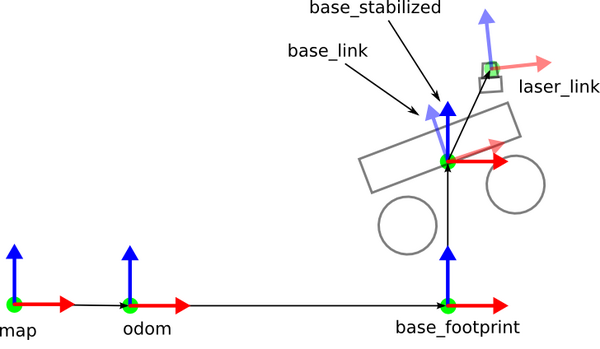
Map – fixed global frame; origin arbitrarily chosen.
Odom – fixed at robot start; drifts slowly over time.
Base_footprint – 2D robot pose; origin under center; moves with robot.
Base_link – 3D robot frame; origin at center/pivot; moves with robot.
Laser_link – LIDAR frame; fixed relative to base_link.
The frame attached to the robot is called base_link. The odom represents the world origin, and the transform from odom to base_link is calculated (e.g. by differential drive controller) using wheel odometry.
Wheel Odometry
Any small section of the odometry is smooth, with minimal error, but error compounds over time
Odometry effectively measures robot velocity, which is integrated to estimate position (dead reckoning)
Correcting for drift
To reduce compounded error, robots fuse odometry with other sensors:
Info
| Sensor | Helps Correct           | Common Framework     |
| ------ | ----------------------- | -------------------- |
| IMU    | Short-term motion drift | EKF or sensor fusion |
| LiDAR  | Position drift          | LiDAR SLAM           |
| Camera | Visual drift            | Visual SLAM          |
| GPS    | Global drift            | Outdoor navigation   |
This updates the odom to base_link transform, however, which can cause the robot to appear to jump around
Map frame
The map frame shows the robot’s position relative to the global origin of the environment.
A frame in ROS can only have 1 parent, so the localization system calculates the map to odom transform
Why it’s separate: The odom → base_link transform provides smooth, high-frequency updates of the robot’s motion, while the map → odom transform applies slower corrections from SLAM or localization
Composing them (map → odom → base_link) gives a globally accurate and smooth pose without sudden jumps
Topics
/odom
Type: nav_msgs/msg/Odometry
Same position info as odom → base_link TF
Velocity
Covariances
/map
Type: nav_msgs/msg/OccupancyGrid
occupancy data for grid map
base_footprint frame
base_footprint AKA “shadow” of the robot representing its contact with the ground (z = 0)
Orientation: Typically aligned with the robot’s yaw, but ignores pitch and roll
Note: The robot’s pose (position + orientation) in a given frame is equivalent to its transform from that frame.
In other words, the pose tells you where the robot’s frame (e.g., base_link) is relative to its parent frame (e.g., odom or map).
Setting up for slam_toolbox
Add base_footprint link to URDF
In robot_core.xacro, add base_footprint link, which is attached rigidly to the base_link with no offset
For this robot, we treat z0 as the wheel axis