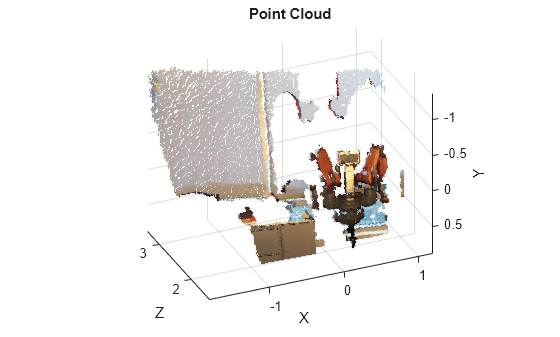
PointCloud2 is a ROS message type that represents 3D point cloud data as a single array of points with various attributes (e.g. X,Y,Z, RGB, intensity, etc.), making it efficient for storing large sets of LiDAR/depth camera data
from sensors like lidars and depth cameras.
# This message holds a collection of N-dimensional points, which may# contain additional information such as normals, intensity, etc. The# point data is stored as a binary blob, its layout described by the# contents of the "fields" array.# The point cloud data may be organized 2d (image-like) or 1d (unordered).# Point clouds organized as 2d images may be produced by camera depth sensors# such as stereo or time-of-flight.# Time of sensor data acquisition, and the coordinate frame ID (for 3d points).std_msgs/Header header# 2D structure of the point cloud. If the cloud is unordered, height is# 1 and width is the length of the point cloud.uint32 heightuint32 width# Describes the channels and their layout in the binary data blob.PointField[] fields#bool is_bigendian # Is this data bigendian?#uint32 point_step # Length of a point in bytes#uint32 row_step # Length of a row in bytes#uint8[] data # Actual point data, size is (row_step*height)#bool is_dense # True if there are no invalid points
I think this is where you’re getting confused. The data elements are not x, y, z coordinates; they are bytes of data. The other parameters indicate how to read them. In this case point_step = 16 indicates each point is 16 bytes, so each of its 4 components (fields) would be 4 bytes, which makes sense as they are 32-bit floats (datatype: 7; see sensor_msgs/PointField).
width: 119597
As you said, this indicates that you have 119597 points in your cloud. row_step * height is the length of data in bytes (1913552 as you noted), but each point is 16 bytes long. Therefore, the number of points in data is 1913552 / 16 = 119597 as previously indicated.
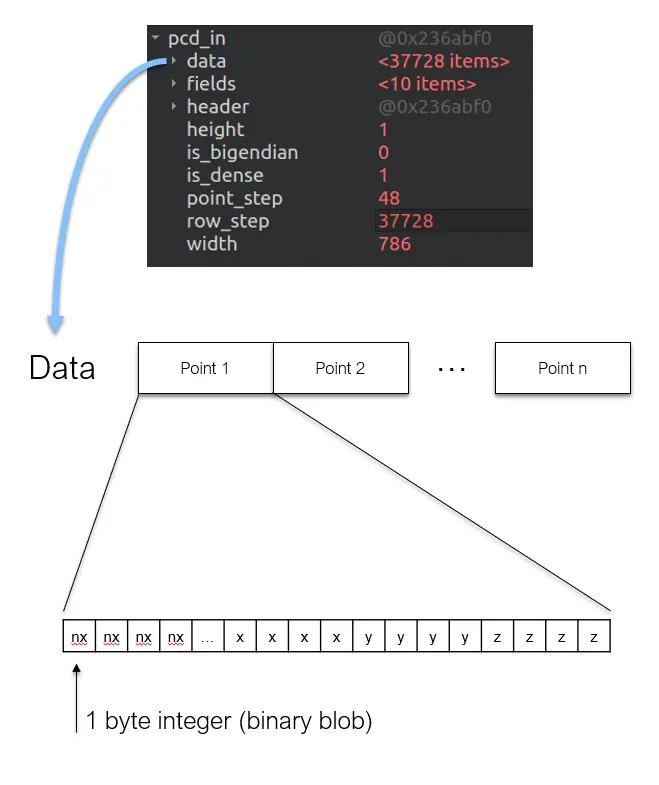
PointCloud2 Documentation is informing about those compoenents that weren’t there in that of PointCloud. (i.e. row_step, data, etc). Essentially, it is composed of meta data that describe the structure of the data and the data, in short, the data and everything else. “data” is an array type, but it is NOT an array of point data type but of 8 bit integer, which would be equivalent to 1 byte char in size.
So, data[3] does NOT mean the data of the point with index 3. One byte can’t even hold all that information! Does that mean we can’t access to point data by point indices? We still can do that, but we need some tricks to do it, like reconstructing floating number data out of multiple single-byte data. Seriously, it was so hard to understand why the newer type is harder to utilize. A simple illustration is as below: (please note the order is as defined in
If one notices how the actual point data is arranged in the PointCloud2 message, it is in the fashion of an 1D array. This is highly non-intuitive from a user perspective yet it is implemented so in the name of efficiency and scalability. The offset parameter helps in differentiating the information of one point data from another in this 1D array.